
best ai tools for product managers in 2026
how i build an ai stack that actually ships instead of just sitting in a notion page
if you’d rather listen than read, check out the latest episode on “the ai toolkit every product manager needs in 2026.”
how i think about ai tools as a pm
before the list, i want to set the frame clearly. as a pm, your ai stack is not a toy shelf. it is the set of systems that sit behind you when you walk into a roadmap review and someone asks, “how do we know this is worth building”.
the way i think about tools now is simple:
can this remove a full category of busywork from my week
can this give me a clearer, faster decision
can this turn one pm into what used to feel like a small team
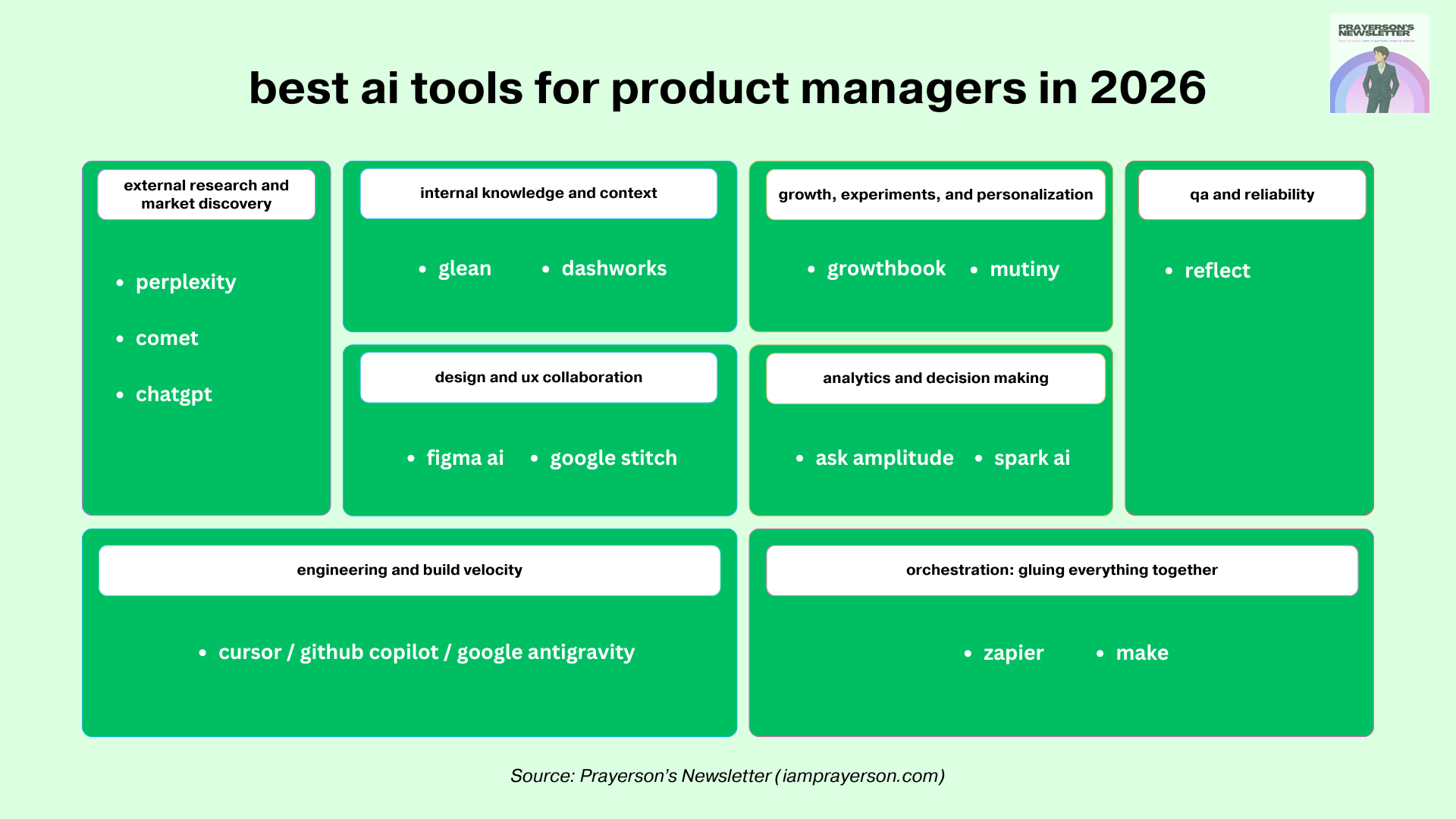
with that lens, here is how i break the stack:
external research and market discovery
internal knowledge and context
design and ux collaboration
engineering and build velocity
qa and reliability
growth, experiments, and personalization
analytics and decision making
orchestration: gluing everything together
within each, i am picking tools that already prove they can change how teams work.
external research and market discovery
perplexity and comet for deep research
perplexity started as “ai search” but it has quietly become one of the most useful research tools for product work. the core behavior is simple: you ask a question in natural language, it pulls from multiple sources, cites them, and lets you follow up without losing context. the value for a pm is that it keeps track of the conversation while you move from market size, to competitor moves, to technical constraints, to recent news in one thread.
comet, their ai-powered browser, pushes this further. instead of only answering queries, it sits on top of your browsing and turns a messy research session into a structured artifact. you skim ten tabs on a new competitor, comet can summarize them, highlight patterns, and keep that as a reusable research object for the team. for discovery work like “what are the real pricing patterns in this category” or “how are others handling kyc flows”, that matters more than a single smart answer.
the reason i rate perplexity and comet highly for pm’s is that they compress that horrible first three hours of any new topic. instead of collecting a pile of links and half read tabs, you get a grounded, cited summary plus a trail you can revisit later. on top of that, the citation layer helps when you are writing strategy docs and need to show where a claim came from instead of hand waving your way through a deck.
chatgpt with browsing for structured exploration
a general purpose assistant with browsing sits next to perplexity nicely. i treat it as a thinking partner rather than a search engine. where perplexity is great at “what is happening and who said what”, a model with browsing is great at “help me reason through this and pull in specifics when needed”.
a typical flow for me looks like this: i use perplexity to gather the landscape, then switch to a chat interface with browsing to stress test a strategy. “given these competitors, these constraints, and this user behavior, outline three approaches, then pull concrete examples of similar patterns from the web.” that blend of reasoning plus fresh context is something pure search cannot do well.
this matters for pm’s because a lot of work is synthesis. you collect inputs from users, market data, tech constraints, and revenue goals, then you try to make a coherent story. a model with browsing becomes the fast way to create draft narratives and compare options, while still letting you pull in the actual sources when it is time to justify a decision.
internal knowledge and context
glean as your company wide memory
glean is one of the clearest examples of what an internal knowledge copilot should feel like. it connects to your internal tools, understands documents, tickets, chats, and dashboards, and lets you ask questions in natural language. instead of “where is that spec from last year”, you can ask “show me the last three proposals we made to change onboarding, and highlight the objections from sales”. the system uses vector search and an enterprise graph to personalise results and keep permissions intact.
for a pm, that is huge. you can walk into a meeting already knowing what has been tried before, where experiments failed, and which teams already solved half your problem in another product line. companies using glean report saving thousands of hours a month on internal search and faster onboarding because new hires can self serve context instead of booking “teach me the org” calls all week.
the other useful thing: glean has a deep research mode that plans and executes research across both web and internal data, then produces a structured, cited report. that is almost exactly what you want when you are writing a big product brief that touches multiple systems and historical decisions.
dashworks for day to day questions
dashworks plays in a similar space but focuses heavily on being a day to day work assistant that lives in the tools you already use, like slack or the browser. it indexes your docs, tickets, and wikis, and lets you ask quick questions without memorizing where everything lives.
the difference in feel is that glean leans into a big platform vision and deep research, while dashworks often feels lighter weight for quick questions and task support. for pm’s, the combination is powerful. you treat internal knowledge as an always on layer, so “who owns this”, “what did legal say about this”, and “did we ever run an experiment on upsell here” become solvable queries instead of detective work.
design and ux collaboration
figma ai as your first design collaborator
figma ai is one of those features that does not look dramatic in a launch video, but once you use it inside figjam and design files, it changes the flavor of early product work. figma ai can generate flows from text prompts, turn messy whiteboard scribbles into clean diagrams, summarize feedback, and even rewrite copy to better fit a tone, length, or language.
for pm’s who are not full time designers, this is perfect. you can sketch a rough “user signs up, then hits paywall, then chooses plan” flow, run figjam ai on it, and get something your designer can react to instead of a wall of bullet points. you can take a long design review thread and ask figma ai to summarise the main concerns before you propose changes. that keeps the design partnership focused on judgment and craft instead of diagram maintenance.
figma’s newer work around making its designs accessible to ai agents, through things like model context protocol integrations and figma make, also matters for pm’s. it means your ai stack can eventually talk to real design structure, not just screenshots, which opens the door for automated checks, smarter handoffs, and even agent assisted prototyping.
stitch (aka galileo) for fast ui exploration
galileo started as one of the most notable ui generation tools that could take a text prompt and convert it into a functional layout. you could describe a pricing screen, onboarding flow, dashboard, even a signup form, and galileo would return a polished ui variant aligned to common design heuristics. that made it useful for early product exploration, where the goal is not perfect design, but rapid alignment on structure and intent.
galileo ai was later acquired by google and evolved into what we now know as stitch. so when you see google stitch today, you are essentially looking at the next-generation version of galileo operating under google’s ecosystem. the core principles remain, but the capabilities are better integrated, more production aware, and more aligned with the rest of google’s dev tooling.
stitch pushes the category further. instead of treating ui as an isolated output, it connects generative design to real code scaffolding. this matters for pm’s because you can move from “idea” to “prototype” without dropping into the multiday limbo where design and engineering handoffs slow everything down. you prompt, stitch renders, and engineers refine instead of rebuild.
for product work, this changes the rhythm. early design reviews no longer start with a blank page, a verbal explanation, or a figma wireframe someone drew at midnight. they start from a tangible interface with hierarchy, copy, interactions, and spacing already in place. it gives you a usable starting point for brainstorming feature direction and shaping the mvp version of the design instead of debating from scratch.
engineering and build velocity
cursor as the practical ai coding environment
cursor has grown into one of the most talked about ai-first code editors. it combines a modern editor with tight integration to large language models, support for multi file context, and workflows for multi agent debugging. engineers can ask cursor to understand an unfamiliar codebase, refactor entire modules, write tests, or debug failing logic, all from inside the editor.
for pm’s, the value is indirect but real. a team using a tool like cursor can ship more experiments, refactor messy areas faster, and spend less time on undifferentiated scaffolding. you also get a better way to explore the system yourself. even if you are not writing production code, you can ask cursor style tooling to explain how a feature works, highlight where configuration lives, or summarize a service’s behavior before you propose changes.
paired with copilot by github or similar assistants like google antigravity, the day to day engineering stack increasingly looks like “human engineer plus ai pair” as the default. that shifts how you think about scope. small teams can take on more ambitious work because the repetitive parts of the build are handled by the stack, not by junior engineers burning evenings on boilerplate.
qa and reliability
reflect for autonomous regression
qa is usually the area that gets ignored in tool lists, which is funny, because it is where a lot of launch anxiety lives. reflect focuses on automated browser testing. you record flows in a real browser, the tool turns those into maintainable tests, and ai helps stabilize selectors and keep tests from breaking every time someone nudges a button five pixels to the left.
for pm’s, a setup like this changes the emotion around shipping. instead of asking “can we afford regression this cycle”, you bake test coverage into the normal rhythm. reflect and similar tools can run suites continuously, catch front end breakages early, and free your single remaining qa specialist to focus on edge cases, accessibility, or performance, instead of walking through the same login flow forty times a week.
when you combine this with ai assisted unit and integration tests from your engineering stack, you get to a place where the main constraint on velocity is product clarity, not test overhead. that is exactly where a pm should want to be.
growth, experiments, and personalization
growthbook for flags and experiments
growthbook is an open source platform for feature flags and experimentation. it lets you roll out features gradually, target specific segments, and run a/b tests with serious statistical machinery like sequential testing and cuped baked in.
the reason it fits into an ai tools list is that once your product has a good experimentation layer, your ai stack can help you design, analyze, and iterate on tests much faster. you can use models to suggest variants, predict likely winners, and summarize experiment results in words that stakeholders understand, while growthbook holds the actual experiment logic and safeguards.
for pm’s, this is an upgrade. instead of “we shipped this and watched mixpanel”, you have a structured loop where every feature ships behind a flag, experiments run by default, and ai assists you in interpreting outcomes, spotting anomalies, and proposing next steps.
mutiny for website personalization
mutiny focuses on b2b website personalization. it lets marketing and product teams create targeted experiences for different account segments, adjust copy and components through a visual editor, and use ai to generate or refine messaging.
for a pm working on a growth surface like pricing pages, onboarding flows, or product tours, mutiny is a way to turn the website into a continuously evolving experiment rather than a static brochure. instead of a single “best guess” landing page, you can run variations for different segments, measure lift, and feed those learnings back into your roadmap.
the interesting part in 2026 about personalization is that ai is writing and testing copy variants, while tools like mutiny handle routing and measurement. your job becomes deciding which hypotheses matter and how aggressive you want to be with segmentation.
analytics and decision making
ask amplitude as a conversational analytics layer
amplitude has been investing in an ai assisted interface called ask amplitude, which lets you query product data in natural language. instead of building every chart manually, you type “show me week over week retention for users who tried feature x within their first three sessions” and the system translates that into the right query and returns a chart plus explanation.
for pm’s who are not deep sql or event taxonomy experts, this is a big plus. it reduces the dependency on a single analytics specialist and makes exploratory analysis possible in the middle of a meeting or while you are drafting a spec. the more you use it, the more it nudges you toward asking sharper questions about behavior instead of relying on vanity metrics.
paired with amplitude’s ai data assistant for governance, you also get help in spotting broken events, inconsistent naming, or missing properties, which directly improves the quality of every decision that sits on top.
mixpanel spark ai for “chatting with your product”
mixpanel has its own ai layer called spark ai that lets you chat with your product data. you can ask follow up questions, drill into specific cohorts, and explore funnels without rebuilding charts from scratch.
for pm’s, the main benefit is speed from question to insight. you can move from “this feature’s adoption feels low” to “what does adoption look like by country, device, and acquisition channel” in one conversation with the analytics layer. that shortens feedback loops and makes it more natural to ground product debates in actual behavior.
taken together, ask amplitude and spark ai are examples of a bigger shift. analytics tools are turning into conversational partners that sit inside your ai stack, instead of separate dashboards you only visit at quarter end.
orchestration: where everything comes together
zapier and make as the connective tissue
once you have research tools, design helpers, build accelerators, qa agents, growth platforms, and analytics assistants, the missing piece is orchestration. a lot of product work is glue. “when this metric drops, create a ticket.” “when an experiment crosses significance, post the result in slack.” “when a user finishes onboarding, trigger a personalised walkthrough.”
zapier has been repositioning itself as an ai orchestration platform. it connects thousands of apps and is adding ai native features like copilot for building workflows and mcp integrations that let ai agents call actions across your stack.
make sits in a similar space but leans heavily into visual, real time automation for ai and agents. you can drag and drop workflows that mix normal apis with model calls, build multi step automations, and see every run on a canvas. companies using make report large time and cost savings when they use it to stitch together ai assisted support, operations, and back office processes.
for pm’s, these tools are the difference between “we have powerful systems that live in silos” and “we have a coherent ai powered product team that talks to itself”. you can automate the boring loops, keep humans in the high risk or high judgment moments, and design flows where agents trigger other agents without you constantly playing traffic cop.
closing reflection: your stack is the team
this is the biggest takeaway for me in 2026. the best ai tools for product managers are not exciting because they exist. they are exciting because they let one pm operate like a small, well coordinated team.
research agents compress weeks of tab hunting into an afternoon. internal copilots keep the entire history of your org within reach. design helpers turn vague ideas into concrete options. coding assistants and qa agents raise the floor on build quality. growth and analytics layers make it cheaper and faster to learn from users. orchestration tools keep the whole thing running without you pushing every button manually.
if you pick tools carefully and actually wire them into your daily work, your ai stack becomes your new product team. not a replacement for the humans, but a force multiplier that removes the low leverage parts of the job so you can spend more time on judgment, storytelling, and system design.
your ai stack is a non-negotiable to become a pm in the age of ai. the pm who treats these tools as a serious stack will feel their leverage grow every quarter. the pm who treats them as a wall of logos for a slide will feel the gap widen and wonder when exactly the job started to move away from them.